Wednesday, 11 March 2026

Buying a Car with Cinch - Not So Great . . .


Cinch: Slick Interface, Shady Service? My 30-Year Auto Trader Streak Ends in a "Faff"

For nearly 30 years, I’ve used Auto Trader to buy my cars. It’s always been a reasonably straightforward process, even if the quality of the cars has varied dramatically. There’s something grounded about supporting a local small business—even if it means turning up to a scrap of industrial land on the outskirts of town to drink instant coffee while poring over old service records.

This time, with my current car broken and my travel options limited, I needed something local. I set my criteria to a 50-mile radius and found what looked like a great deal: a car advertised just 16 miles away. The purchase started through a company called Cinch using a "slick and easy" online interface. You fill out the paperwork in the comfort of your own home instead of a dingy porter cabin.


The 240-Mile "Local" Car

The "slick" process hit a wall the moment the paperwork was done. Suddenly, I discovered the car wasn't 16 miles away in Taunton; it was actually in Corby, 240 miles away. To make matters worse, they wanted to charge an extra £300 to pick it up from where they said it was in the first place.

"This is all starting to sound a bit fishy... but you can't really pull out because if you're buying with finance, you've already run your credit check and you can't run lots of those and expect to keep getting approvals."

I spoke to a representative who admitted the 16-mile advertisement was "a bit misleading" and suggested I just buy the car and they would refund the transfer fee. Spoiler alert: they eventually refused to refund that money, which I believe is a breach of consumer law and advertising guidelines.


A "Luxury" Dacia and a Missing History

I eventually went to Avonmouth to pick up the car. Despite receiving numerous emails saying it was ready, it was actually locked in a compound they didn't have control over. I had to wait around for quite a while just to get my hands on it. This wasn't the staff's fault at Avonmouth they worked really hard to correct cinch's mistake. 

The car itself—a Dacia—actually feels like "absolute luxury" compared to my old Skoda. It’s smooth as butter, but it came with zero service history. For the most expensive car I've ever bought, I was miffed to find nothing but a vague piece of paper from a BAC fleet solution company with unchecked boxes for oil levels and tire torque.

When I challenged customer service, the representative constantly talked over me, claiming their status as an "online retailer" meant they couldn't possibly put accurate locations on Auto Trader because they use regional hubs. It’s warped logic.


The Verdict: Would I recommend Cinch?

No. While I think I got lucky with a decent car, their quality checks feel "mythical" or creative at best, and their sales practices are deceptive. I feel like I’ve betrayed the genuine local sellers who actually provide information when asked. Next time, I’m going back to the local guys.

It not just me that has had this experience. Check out there google maps listing at their head office. 

Friday, 13 February 2026

Can You Solder a Network Cable?


Can You Solder a Network Cable? 

Every DIY tech project starts with a simple goal. Mine was a 100-metre run of Cat6 cable to connect my office to the router. On paper, it’s a standard job. In reality, it became a week-long masterclass in why "the right way" isn't always the best way for your specific setup.

The "Illegal" Win: Soldering Ethernet

When the open reach team chopped the factory fitted ned off of my cable, I didn't reach for a crimping tool. I reached for a soldering iron. To any network engineer, soldering a twisted-pair data cable is heresy. They’ll tell you about signal reflections, impedance mismatches, and cross-talk. An AI query informed me that the solder was a "brick wall" to the signal. 

But here is the fact: It worked. With a steady hand and some insulation tape, that soldered "bodge" delivered a stable 300 Mbps. For my needs, it was a total victory. I had a working solution that respected my existing skills and got the job done.

The Perfection Trap

Then came the trap we all fall into: The "Proper" Fix. The internet (and helpful AI assistants) will tell you that you are "leaving performance on the table" if you don't use standard RJ45 crimps. So, I cut my beautiful solder joints. I spent hours wrestling with stiff, solid-core copper wire, lining up microscopic strands into clear plastic plugs.

The result? The tester showed all green lights, but the actual performance collapsed. The connection became slower and less reliable than the solder joint it replaced.

Lesson learned: Value doesn't come from hitting a theoretical maximum; it comes from utility. If a 300 Mbps "bodge" does everything you need, chasing 900 Mbps at the cost of your sanity is a bad trade.

The Final Verdict: For a 100m run on solid-core cable, save yourself the hours of crimping. If you want a "proper" fix that actually works for novices, use a Punch-Down Junction Box. It’s the middle ground between the "shunned" solder and the "fiddly" crimp.

Sometimes, the best solution isn't the one that's "best" on a datasheet—it's the one that lets you get back to work.

Flood Risk Assessment London 

AI Queries Causing System to Hang


AI Queries Causing System to Hang: How I Tamed My Workstation's Audio Pops

If you're like me, running a beloved, powerful, but aging workstation – in my case, an HP xw8400 with dual Intel Xeon E5345 CPUs and dual NVIDIA NVS 300 graphics cards on Windows 7 – you know the struggle. This machine is a beast for certain tasks, but it has its quirks, especially when it comes to real-time audio.

Recently, I hit a wall: every time I performed an AI query in my browser (Supermium, in this case), my audio would suffer from frustrating clicks and pops. It felt like the system was "hanging" for a split second, causing those dreaded buffer underruns. This wasn't just annoying; it was crippling my ability to work efficiently.

The Problem: LatencyMon Revealed the Culprit

My first step was to fire up LatencyMon, the go-to tool for diagnosing audio dropouts. The results were stark:

  • Massive DPC Latency Spikes: nvlddmkm.sys (the NVIDIA Windows Kernel Mode Driver) was consistently hitting peaks of 30,000 microseconds (µs) during AI queries. Anything over 1,000-2,000 µs is problematic for audio, so 30,000 µs was a red flag the size of a billboard.

  • Hard Pagefaults: My system was also drowning in 22,000 hard pagefaults, indicating that the system was constantly scrambling for data on the slow hard drive. This was primarily caused by psanhost.exe (Panda Antivirus), which I quickly realised was simply too heavy for my setup.

The Journey: Initial Tweaks (and Why They Didn't Fully Work)

I started with the usual suspects, guided by some excellent advice:

  1. NVIDIA Control Panel - Usage Mode: Graphics Only: This was a good first step, preventing the GPUs from trying to act as compute devices. It helped, but the massive spikes remained.

  2. Disabled Hardware Acceleration in Browser: Ensured Supermium wasn't trying to offload too much to the GPU. Again, helpful, but not the silver bullet.

  3. Power Options: High Performance: Kept my Xeons running at full speed.

  4. Task Scheduler & Services Cleanup: Removed any lurking NVIDIA background tasks.

  5. Disabled NVIDIA HD Audio: Prevented audio conflicts.

  6. Texture Filtering - Negative LOD Bias: Clamp: Reduced unnecessary GPU sharpening.

  7. Multi-display/mixed-GPU acceleration: Single Display Performance Mode: Simplified how the driver handled my four monitors.

  8. Threaded Optimisation: Off: Stopped the driver from scattering work across my 8 CPU cores.

While these steps collectively improved the system's responsiveness and reduced some background noise, the crucial nvlddmkm.sys DPC spikes during those AI queries persisted. The 30,000 µs monster was still there.

The Breakthrough: Maximum Pre-rendered Frames to "1"

After all those tweaks, the final, most impactful change came down to a single setting in the NVIDIA Control Panel:

Maximum Pre-rendered Frames: Set to 1

This seemingly small adjustment was the key to unlocking real-time performance on my vintage workstation.

Why "Maximum Pre-rendered Frames = 1" Fixed It:

  • Stopping the CPU from "Looking Ahead": By default, the NVIDIA driver tries to prepare multiple frames (often 3 or more) in advance to ensure smooth visuals. On a modern system, this is fine. On my xw8400, feeding two NVS 300 cards from a Front Side Bus (FSB), this "pre-rendering" was causing the CPU to get utterly swamped with graphics tasks. It was constantly buffering frames, delaying critical audio data.

  • Clearing the System Bus: When an AI query rapidly streams text and updates the screen, it demands a continuous flow of new frames. With a buffer of 3, the CPU was frantically trying to keep up, creating a massive traffic jam on the system bus. Setting it to 1 forces the CPU to prepare just one frame at a time, send it, and immediately move on. This dramatically reduces the amount of time nvlddmkm.sys holds onto the CPU, allowing the audio stream to flow uninterrupted.

  • The AI Query Trigger: The dynamic, text-streaming nature of AI interfaces specifically exposed this bottleneck. Each word appearing on screen triggered the intensive frame pre-rendering, leading directly to the clicks.

The Result: Silence at Last

After applying this change, the difference was immediate and profound. AI queries now run smoothly, the text streams without a hitch, and most importantly, the audio clicks and pops are gone! LatencyMon now shows nvlddmkm.sys behaving itself, with peak DPC times well within acceptable limits.

It turns out, for legacy hardware like the HP xw8400, the less "smart" your graphics driver tries to be with buffering and multi-threading, the better for real-time audio. Sometimes, the simplest solution is the most effective.

If you're battling similar audio latency issues on your older workstation, especially with NVIDIA cards, give that Maximum Pre-rendered Frames = 1 setting a try. It might just save your sanity!

Flood Risk Reports

Tuesday, 15 July 2025

Sustain Hold Pedal Not Working Behringer Pro VS Mini

 Here are some notes that took down while diagnosing why the sustain pedal was not working when controlling my Behringer Pro VS Mini with a Edirol PC-50. 

So firstly I had to check it was not the Edirol PC-50. It is quite old. And maybe someone who owned it before me plugged something i and fried it somehow. 

But my using MIDI-OX on windows 7 and a long chat with Google Gemini:

https://g.co/gemini/share/f3112cfd08a2 

I was able to figure out that the problem lies with the Behringer Pro VS Mini. 

What the PC-50 Does

This is what you get from the PC-50 when the DP-2 pedal is pressed. Which according to Gemini is correct. 

 TIMESTAMP IN PORT STATUS DATA1 DATA2 CHAN NOTE EVENT               

 0000365B   1  --     B0    40    7F    1  ---  CC: Pedal (Sustain)   

 0000378B   1  --     B0    40    00    1  ---  CC: Pedal (Sustain)   


What the Pro VS Mini is Listening for?

So does Pro VS Mini use Standard MIDI CC? - Yes - Controller operates key, and pitch bend etc. 

Does Pro VS Mini use Standard MIDI CC for Hold ? - No it doesn't.


How to make a hold pedal work with Pro VS Mini?

I am not sure if I can be bothered. 

Response from Music Tribe Support 

Dear Dorky Thorpy 
 
This is in relation to CAS-872176-S2C3C7 
 
Product: Behringer PRO VS MINI 
 
Serial: 123456789 
 
Thank you for contacting Music Tribe.

I am sorry for the issue you are facing.

Please be informed that PRO VS MINI does not support MIDI for the sustain pedal.

Please refer to the attached picture of the MIDI supported by PRO VS MINI.

If you need further assistance, please do not hesitate to contact us.

Kind Regards,
 
Arthur Ross , Behringer Support

What does it support: 


Weird supports so much but not sustain / hold !!


Monday, 3 February 2025

My Top Ten Mantras

My Top Ten Mantras 

I suppose we choose mantras in attempt to improve our mindset in one way or another. For me personally mantras are about emotional control. I am currently in a chapter of my life where I need to
  • Relentlessly keep my $h1t together . . . and;
  • Not allow myself to think bitter thoughts (having been wronged by a loved one). . . and;
  • Empower myself (to the extent that it improves my productivity) 
So here we go. Top 10. (Work in Progress - Universal Theme :-) ) 

1 - I am stronger than this feeling.


In pursuit of productivity, negative feelings can be distracting and distract from progress. I appreciated this is not very zen, but I have people relying on me and this mantra keeps me on track to support those around me. 


2 - I am building strength with every challenge I face.


If things are not going quite right, or you feel under pressure, then this is good one as it reminds me that every time I eff something up I get something back from it. i.e. I learn from adversity. 

3 - I am like the sky, vast and able to hold any weather.

Whilst I am confident, and productive I accurately* consider myself as having low self worth. So this mantra I find very good for me, because it makes me feel a big.

*Self worth - Being a scientist I can only view myself as a tiny crumb of matter, stuck on a rock lost in the vastness of space. The fact is that everyone on this planet is unimportant within the context of the wider universe. We have manufactured an importance for ourselves (societal hierarchy etc) which may convey a feeling of importance, but the human race is ultimately of little value. I happy with that thought. 

4 - I am the calm center within the storm.

I do like the weather based mantras. Spending time in nature is good for you, and it is calming so invoking nature in mantras works well for me. 


To be continued . . . 


Friday, 8 November 2024

Audio Output Distortion on AKAI Rhythm Wolf

Audio Output Distortion on AKAI Rhythm Wolf 

I am a relative noob to the world of pro audio equipment. I have made many speakers over the years, and they work well, but I have recently come across a strange problem with recent purchase and here I present my research notes and links to the various resources.

The Problem 

I have recently acquired an akai rhythm wolf drum machine,  and the main signal output is showing some strange behavior.

When I'm using a high quality pair of headphones such as Sennheiser HD280 Pro the sound quality from the rhythmolf is excellent. I am particularly interested in The Sound of the bass drum here.

So the bass drum or kick drum gives out very delicious low rich bass when using the headphones which is what I like the here . . .! . . . however when I plug the output into a speaker which I normally use for listening to music the bass drum sounds very thin and the hardly any bass is produced.

If you turn the volume on the kick drum too far then it starts to distort in a crackly sort of way so I'm trying to figure out what's going on there and why am I getting thin bass when I'm using a speaker and what am I getting why am I getting good base when I'm using headphones.

I should say this behaviour repeats on 3 types of speaker:

  • Small Sony Bluetooth Speaker - Works fine with synth, and other drum machines. 
  • Soundboks 2 - Very heavy duty unit, works fine with synth, and other drum machines. 
  • Home Made Speakers - 2 Large Active Speaker containing 4 x TPA Amplifiers and 4 x 10" subwoofers. Which when playing music from spotify are extremely loud. 

The Fix = Mixer

I contacted AKAI Support there response was:

"The problem with the weak, distorted kick drum might be expected as it is not recommended to directly connect a speaker to the rhythm wolf Main Out. Instead, use a standard 1/4" (6.35mm) TRS cable to connect this line-level output to the input of an audio interface, mixer, amplifier system, etc. Additionally, stereo headphones can be connected to this output. If the Synth Out is left unconnected, the Main Out will include the drum and bass synth voices. However, if a cable is connected to the Synth Out, the Main Out will include the drum voices only."

I also contacted the chap I bought it from:

Me: "Hey mate did you always run this through a mixer"

Seller: "Hi yes I did run it through a mixer. It has some serious sub on the unit, I'd check the EQ settings on your speaker and set it to "flat" is possible." 

AND YES WHEN I RUN THE RHYTHM WOLF THROUGH A MIXER SLIGHTLY LOWERING THE BASS LEVEL IT SOUNDS GREAT. 

Noob Fault Finding 

Below are musing on why this is happening. 

First Reaction 

An initial experiment I tried was to route the output to a headphone amplifier and then the headphone amplifier to the speaker. This didn't work. Very thin "sniky" bass drum. 

Research 


So something coming out of the Rhythm Wolf is the wrong level for the 3 speakers I have tried out. The output has too much power, or not enough, or the receiving speakers are expect something within a certain range and that isn't happening. So lets figure this out:

Impedance 

My HD280 Pros are 64 Ohms. 

"Most headphones have an impedance that is typically between 8-600 ohms."


"All these factors, make us arrive at something important known as Impedance Matching."

A guitar amplifier is high impedance. . . I plugged in the drum machine to a Yamaha GA15 and I get the same behaviour as I do with speakers, the kick drum sounds very very weak. I can turn up the snare drum and other outputs and they are very loud and distortion free. 

"An impedance mismatch in a circuit or along a transmission line will produce a reflection back to the source of the signal. When a signal reflects, the power transferred downstream towards a load is reduced. Impedance matching provides a dual role of enabling power transfer into a load by suppressing reflections."


So it sounds like it could be impedance. But my guitar amp experiment doesn't work. It need to be low to high. 


Voltage 

Is it voltage of the output, I have read 2V is typical. Is it more than that or less?


Power Supply

I have read that using a different power supply for the Rhythm Wolf can fix a problem with distorted outputs. However, I have switched the adaptor and it didn't;'t work. THe manual says 12V 2A Supply which is reasonably beefy. 

It was supplied with a 12v 600ma, but swapping that to a 12v 2a has not helped. 

More amps? Probably won't help. 


Distortion  Notes 


"Possible causes of audio distortion problems may be: Wrong input level to the amplifier. Amplifier gain is set too low or high. Not enough amplifier power."


Monday, 7 October 2024

Is UK2 a Good Hosting Company in 2024?

Is UK2 a Good Hosting Company in 2024?

UK2 is a web hosting provider. They also sell domains and provide more complicated cloud computing services such as VPS etc. But is UK2 a Good Hosting Company in 2024? No they are not. 


Rewind . . . . 


If someone had asked me "Is UK2 a Good Hosting Company" around 2 years ago I would have rated them excellent. Apart from a few domains registered with Google Domains, and a couple of older sties hosted on Firebase, I had all my websites with UK2. Probs about 10 in total. 

The reason I was so please with UK2 up until a couple of years ago was that I thought they really understood what the customer wants, i.e reliability and expandability. 

 All was well. I had used UK2 for over 10 years, and it had been super reliable. THey obviously had it all figured out. . . .

UK2 . . . . THG 

So around Jan - February 2024 I noticed the UK2 website was rebranded UK2 THG. No big deal I though companies get bought out all the time. 

But around April 2024 one day all my websites went down, and when I contacted support no body answered the ticket, I waited for 36 hours before I got a reply. I'm not really sure how much I lost in leads, on a pro-rata basis it would be about £2000. 


Here is the review I left on UK2 THG Google Maps Listing 

So I will write the details of what happened (and reduce to 1 star - facepalm):

a- I had to wait 36 hours for a support ticket to be answered, I missed out on a day and a half of leads, goodness knows how many opportunities lost,
b - turns out this was because you changed from working system (CPanel) to StackCP
c - You didn't update nameservers automatically
d - You didn't even email me to say you were doing this!
e - After 24 hours of waiting I had to make a move and so very laboriously I have had to move my websites and domains to other servers.

Whatever possessed you to mess with a working system, not tell anyone about it, whilst blanking me on support for 36 hours. You couldn't make this stuff up.

Stack CP

But Stack CP is OK right?

No no no, its not OK. I spent 2 hours today trying to hook up filezilla, to FTP. I have to log in to Stack CP to unlock, and then the FTP client won't connect. I have tried dozens of different configs. No joy. 

Well perhaps I can upload the files using file manger. No. In trying to upload about 8 files to the required director it results in files disappearing instead of being overwritten, and not all of them are over written. Its a right mess. 

So from my limited experience Stack CP os absolute garbage. I wonder how much money they saved by switching.

Conclusion 

I would have been a customer for life with UK2, I had no reason to change. I don't pay a lot say £240 a year of something like that. But I would have paid it for years to come. . . happily for a reliable service. 

I wonder how many customers they lost. 

FYI I went to Hostinger they do a specific Control Panel hosting package. It costs about a quarter of the price and works just as well. 

If only I could get back the 50 hours or so it took me to migrate (nearly) everything. 


Friday, 16 February 2024

Number of Cores vs Clock Speed - Which is Better

Number of Cores vs Clock Speed - Summary  

In all instances I have found it better to have more cores, as a opposed to fewer cores, regardless of clock speed. 

Number of Cores vs Clock Speed - Example 

I run a XW8400 and an XW6600. They are both capable of running 8 cores split over two physical processors.  

I have run the XW8400 in two configurations:

  • 2 x Xeon 5160 (2 x 2 Core Processors @ 3.00GHZ - Total 4 Cores)
  • 2 x Xeon E5345 (2 x 4 Core Processors @ 2.33GHZ - Total 8 Cores)
Despite the significantly lower clock speed, the 8 core set up is:

  • Quicker 
  • Less Glitchy 
  • More Stable 

Number of Cores vs Clock Speed - How Do I Know This 

https://www.cpubenchmark.net/ gives the following marks for the CPUs


Both systems are running 16GB RAM and High Quality SSDs. As such bottlenecks from these components are reduced. 

I also really do trash this old PC with modern heavy modelling software & and video encoding. And have found that in all cases the machine is less prone to hang ups, and crashes when run in an 8 core configuration, as opposed to a 4 core configuration. And also completes tasks much moire quickly. 

This is based on 10 years of observations, and using the same machine with 3 different operating systems (XP / 7 / 10). 

Additional 

Why am I using such an old (18 years) PC?

This:


And guess what this 18 year old PC still works really well. Please consider fixing / or upgrading what you already have, rather then adding discarding your equipment and adding to the e-waste problem. 


Saturday, 9 September 2023

How to Remove a Tangle of Rope or Net from a Beach

How to Remove a Large Tangle of Rope or Net from a Beach

This blog post describes some methods I have used to Remove a Large Tangle of Rope from a Beach. I also go on to describe some other methods you might use. 

I have recently returned from Scotland, doing some volunteer work for People Against Plastic Pollution . For one entire day I worked to remove a 249kg rope tangle that had been thrown above the tide line. 

Rope Tangle Removal Video 

Perhaps the quickest way to show how I did it is with the below video. 


The video shows:

  1. Untangling the rope, 
  2. Cutting up the rope.
  3. Dragging rope to road head.
  4. Loading in to trailer.
We also show the rope being weighed. Most people wouldn't bother to do this. 

Untangling the Rope

This is seldom worth doing, but on large ropes it can be worthwhile. Some filament net will be impossible to untangle.

Cutting Up a Tangle of Rope or Net from a Beach

I used a sharp knife to cut up the rope in to manageable chunks. I started off used an Opinel No.6. Which I have always found to be very good, but when it got blunt I switched to a Culinary Victorinox folding knife. This latter knife had a thinner cross section and cut through the rope a lot more easily.

Of course using a knife (although cheap and effective) has a couple of drawbacks. 

  • As you saw through the rope you do release some of the fibre that are then too small to pick up. 
  • You had will get very tiered. 
  • It is quite dangerous, you may cut yourself. 
Alternatives might include:

  • Using a "hot knife" to melt through the plastic rope of fishing net. 
  • Using a team of people to drag the entire rope of net off of the beach in one piece.
  • Using a machine (excavator of tractor bucket) to lift the rope of net off the beach in one piece. 
The below video shows student in South California removing filament net from a beach. 


Dragging the Rope or Net to Road Head 

For most people the route to a disposal point for the rope or net will involve road transport. Luckily on most beaches it is quite easy to drag collected plastic along the beach to a point where a skip, trailer, or truck can be parked.  

However for very remote locations it has been known to use helicopters (see below video), or as we are planning next year a boat to haul out the plastic rubbish from beach. 


Other Ideas for Getting Rope and Net from Beach

Here is a further list of ideas for getting plastic rope and nets from beaches:

  • Hire an excavator and to dig out buried rope and net. 
  • Use a quad bike and trailer to tow waste off of sure. 
  • Use a winch to drag bags or clumps or net and rope along beach (dangerous)
  • Dumper trucks (tracked and wheeled)
  • Ask a farmer to tow a trailer down to beach. 
  • Use a helicopter.
  • Use a landing craft to access beach from the sea. 

Sunday, 14 May 2023

Metric Sizes for Fives Court

Rugby Fives Court Size

  • Width 18ft (5.86m)
  • Length 24ft (7.3152)

Fives Court vs Squash Court 

A squash court is a bit bigger.
  • Width 6.4m
  • Length 9.75m


Tuesday, 18 April 2023

Best Headphones for Bass

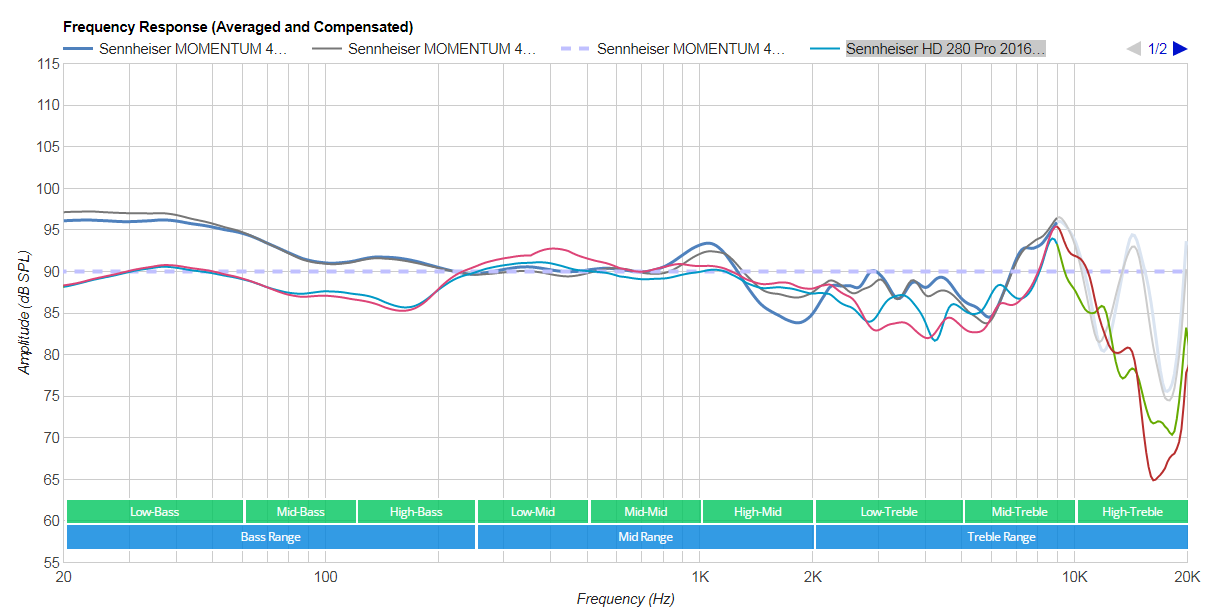
This page shows the best headphones with good bass response. These screen shots are taken from RTings.com

It is my birthday next months and I am research which headphones might give best bass for electronic dance music. 

Sennheiser MOMENTUM 4 Wireless Headphones

Please note these were best over ear headphones I could find for bass. And have used these as a benchmark. 


7HZ Timeless


AKG N700NC M2 Wireless

AKG K371


JBL Tune 760NC Wireless 


I actually have a pair of these. The bass is OK.


Sennheiser HD 280 Pro 2016…

I have a pair of these. They are very loud, and clear, and with an equaliser they sound really good for EDM. 


Sony WH-1000XM4 Wireless…


My daughter has a pair of these and they are very good. Very strong bass. 


JBL CLUB 700BT Wireless

The response on these looks amazing. But they are "on" ear. I prefer over ear. 

JBL CLUB ONE Wireless

Conclusions


So after looking at above I will either go for 

Sony WH-1000XM4 Wireless

or 

Sennheiser MOMENTUM 4 Wireless Headphones

Potentially 

AKG N700NC M2 Wireless


Phosphate Assessment 


Wednesday, 18 January 2023

A Map Showing Various Points of Interest Around Wimbleball Reservoir

Wimbleball for Tourists and Nerds Alike

Wimbleball Reservoir, or Wimbleball Lake. Is an interesting place for tourists to visit, but it is also very interesting for engineers and scientists, as there is a lot of interesting things going on to make it work. 

Please find the below map that shows interesting features. You can click on markers to reveal extra facts and figures. 


Tuesday, 17 January 2023

Videos Play with Audio Only when Downloaded from Google Photos

The Problem  

When I download a video from Google Photos the video is audio only, no visual element is included. 

I upload a working video (.MOV) from my Apple iphone, and when I then downloaded that video to my PC, I only get the audio. 

By "working" I mean that I can use the .MOV file on my PC, watching it in media player, or editing it in Movie Maker. 

Google support forums have lots of people with this problem, but no solution is offered. After using google support for first time owing to a problem. I now have two problems as they terminated our conversation without a solution. They have said they will email. . .  but we'll see. 

Immediate Work Around

If you just need a quick fix then you can use an online convertor to change .MOV to MP4. You can then use the MP4 files in you editing software. 

More Detail

After 1 hour on chat with a two google support staff, I narrow problem to:

"So problem videos use hvc1 codec. . . . and working videos use avc1 codec. I upload an avc1 codec video to google photos and it downloads as hcv1."


I found a handy little program called GSpot  that analysis video files and this told me about the different codec that were being used before and after download. 

When I transfer a video using a USB cable, it arrives on PC as avc1 codec. This works perfectly. Please note where the video codec name comes back as H.264


When I download a video from google photos, the video codec is different and is Named as "unknown". 


Fix 1 - Change Video Storage Format on Iphone

This fix will not help with videos already stored on Google Photos. But it will fix onward compatibility problems. 

On you iphone navigate:

  1. Settings
  2. Camera
  3. Formats
  4. Select: (Compatibility)
If I do this then I find I can download videos from google photos and work with them on the PC. 

Fix 2 - Pending


Hopefully Google Support will get back with a proper fix.

Transcript from Support Chat 


You can download PDF here. 

Chat transcript for case: 7-7409000033723 17 Jan, 00:46 (Pacific Time) 00:46:26 Maze: Maze joined the conversation 00:46:26 Dorky Thorpy: Dorky Thorpy joined the conversation 00:46:28 Maze: 7-7409000033723 Hi Dorky Thorpy. Thanks for being a Google One member. My name is Maze. How are you today? 00:46:37 Dorky Thorpy: Good thanks 00:46:44 Dorky Thorpy: You? 00:46:54 Maze: I'm glad to hear that, Dorky. I'm doing well, thanks for asking. 00:47:02 Maze: Before we proceed, may I confirm that you're contacting us about the email rollingreenhills@gmail.com, is that right? 00:47:11 Dorky Thorpy: yes 00:47:44 Maze: Thanks for confirming your email. I can see here that you have a concern with the download videos from Google Photos as it is playing as audio only, am I right? 00:47:54 Dorky Thorpy: yes 00:49:07 Maze: I'm sorry to hear that and I totally understand. No worries, I'll do my best to help you and if we can't find a solution, I will collect feedback for our developers and give you an external resource that you might be able to use. 00:49:21 Maze: May I know what device you are currently using? 00:51:27 Maze: Just checking, are we still connected? 00:51:30 Dorky Thorpy: I am downloading videos from google photos to a windows 7 PC. I can play the video OK straight in google photos. And I can take them straight off iphone with USB cable. It is download from google photos that is problematic, audio only. 00:52:13 Maze: Is it happening on all the videos? 00:52:28 Maze: Or there's only a certain video that having this kind of issue? 00:52:51 Dorky Thorpy: I have downloaded a zip file, with 5 videos in and they all show same problem. 00:53:11 Maze: And can you tell me the file type of video that was saved on Google Photos and if it is changing after downloading on your computer? 00:53:43 Maze: Is it possible if you can try to download the 1 video and tell me if it is the same issue? 00:53:54 Dorky Thorpy: They are both .mov (quick time). 00:54:31 Dorky Thorpy: Yes I have downloaded a single video (this arrives unzipped) and I have the same issue. 00:55:23 Maze: Can you please try to go to this link https://photos.google.com/unsupportedvideos? 00:55:36 Maze: Then, select 1 video to download. 00:55:42 Maze: And let me know how it goes. 00:57:43 Dorky Thorpy: Tried both, and neither play. 00:57:44 Dorky Thorpy: TITLE.doc [Compatibility Mode] - Word_2023-01-17_08-56-21.jpg 00:57:52 Maze: Checking. 00:58:39 Maze: Is it still downloading as mov file? 00:58:57 Maze: And can you also please try downloading 1 video via phone device? 00:59:07 Dorky Thorpy: No they downloaded oK, but wouldn't play as per screen shot. 00:59:33 Maze: Okay, do you have VLC media player on your computer? 01:00:02 Dorky Thorpy: yes i'll try that 01:00:13 Maze: Let me know how it goes. 01:00:33 Maze: As mov is a video format that was developed by Apple. 01:01:02 Dorky Thorpy: 0130_Message.jpg 01:01:10 Maze: Checking. 01:01:25 Dorky Thorpy: Same message for 0128 01:02:00 Maze: Is it downloaded as .mov format or hvc1.? 01:02:22 Dorky Thorpy: In downloads folder it is : .MOV 01:02:46 Dorky Thorpy: But message in screen shot (from VCL) says hvc1. . . 01:03:26 Maze: That's right. Can you try to convert this video file to mp4? 01:03:44 Dorky Thorpy: how do I do that please 01:04:30 Maze: You can go to www.google.com. 01:04:42 Maze: And search for .mov converter to mp4. 01:06:19 Dorky Thorpy: Yes that work for 0130 01:07:17 Maze: Okay, it means that it was not supported by the Windows Media Player. 01:07:34 Maze: Because of Apple restrictions with the file type. 01:08:07 Maze: As the .mov file developed by Apple. 01:08:16 Dorky Thorpy: But why can I take videos off of phone with uSB cable, they work ok then. 01:09:23 Dorky Thorpy: Code I not download a codec pack or something, is that a good idea ? 01:10:12 Maze: Apologies, as this restrictions are set by Apple but I can recommend you to contact Windows to better assist you with this matter. 01:11:02 Maze: As we don't have tools and resources for this information regarding with Apple restriction and Windows media player. 01:11:45 Dorky Thorpy: This is clearly a google problem. I upload videos that work to google photos, and then when I download them, they don't work anymore. It is not an apple restriction, because I can play the videos when I take straight from device when I use USB. 01:14:35 Maze: I do understand. However, once you upload to Google Photos it will only copy the file type from your device and that's the reason why it is working properly. The file type is working properly it's just that your Windows Media Player doesn't support this file type. 01:15:40 Dorky Thorpy: So my phone is running a newer version of .mov? 01:15:59 Dorky Thorpy: If that is case how come, I can get file with USB and it works OK. 01:16:57 Maze: Do you mean that you are downloading the videos on your USB from Google Photos, is that right? 01:19:33 Maze: Because if the download file is the same format from the Google Photos, there's no issue on your file, it is just the media player that you are using. 01:19:56 Dorky Thorpy: No. I take video from phone to PC, with no issues. 01:20:23 Dorky Thorpy: I take .MOV from phone with USB = Good 01:20:42 Dorky Thorpy: I take .MOV from google photos download = Bad 01:21:35 Maze: It is only with the file format that is accepting by your media player. 01:21:42 Maze: But there's no issue with the file. 01:22:21 Dorky Thorpy: So the upload / download to google photos, is changing the video somehow. How do I stop that happening. 01:23:17 Maze: I'll be needing to check on my resources more about your issue. Can you give me 4-6 minutes? 01:23:51 Dorky Thorpy: Yes that is fine. 01:25:01 Maze: Thanks and I'll be right back. 01:29:42 Maze: Thanks for patiently waiting, Dorky. 01:30:31 Maze: Windows Media Player can play MOV files, but you need to download and install the 3ivx codec software. 01:31:30 Maze: As if you are unable to play it properly with the particular file type on your Windows device, it's because you do not have the program that runs that type of file installed on your computer. 01:33:16 Maze: Not to rush you, but are you still there? 01:33:28 Dorky Thorpy: Working 01:34:02 Maze: I'm glad we're still connected. Please take your time and keep me updated. 01:39:43 Maze: Just checking, are you still working on it? 01:40:17 Dorky Thorpy: Hmmm. So even if I open the download video from google photos with itunes it doesn't work then either. 01:41:06 Dorky Thorpy: Have downloaded and installed 3ivx and that didn't work. 01:41:34 Maze: Can you send a screenshot of the error message? 01:42:18 Dorky Thorpy: itunes - plays with sounds only, same as media player 01:42:33 Dorky Thorpy: 3ivx - same error messages as before 01:43:20 Maze: Can your tell me the OS version of your computer as well? 01:43:50 Dorky Thorpy: Windows 7 Service Pack 1 01:45:16 Maze: Thank you! I am going to consult it to our higher tier. 01:47:41 Dorky Thorpy: Analysis of Video Downloaded from Google Photos 01:47:41 Dorky Thorpy: Program Manager_2023-01-17_09-46-55.jpg 01:47:54 Maze: Checking. 01:49:02 Maze: I am already connected to our higher tier. 01:49:24 Dorky Thorpy: Analysis of Video taken with USB to PC - This plays OK 01:49:24 Dorky Thorpy: Program Manager_2023-01-17_09-48-06.jpg 01:51:42 Maze: I'm already explaining the said concern to our higher tier. 01:54:38 Dorky Thorpy: So problem videos use hvc1 codec. . . . and working videos use avc1 codec. I upload an avc1 codec video to google photos and it downloads as hcv1. 01:56:04 Maze: So it means that the file format was changed, it that right? 01:56:40 Dorky Thorpy: Yes still .MOV. But requiring different codec. 01:57:15 Maze: I'm advising our higher tier about this matter. 02:00:43 Maze: Did you change the file type? 02:01:06 Maze: Can you tell me how did you upload the videos on your Google Photos? 02:01:07 Dorky Thorpy: No i didnt change anything. 02:02:13 Dorky Thorpy: The photos were backed up, from my iphone. 02:02:25 Dorky Thorpy: using google photos app 02:03:58 Maze: Informing it to our higher tier now. 02:08:20 Maze: Can you confirm if you are having issue when downloading the video back to your iPhone device? 02:08:57 Dorky Thorpy: When I take video from iphone with USB cable there is no issue. 02:09:17 Maze: How about from Google Photos app directly? 02:09:58 Dorky Thorpy: If you look at the hcv1 codec analysis in screen shot from GSpot it say it is "unknown". So google photos downloads are using an unknown codec? 02:10:28 Dorky Thorpy: You can watch videos OK directly in google photos app. 02:10:28 Maze: It is to set aside the issue. 02:12:29 Maze: Are you able to do it? 02:12:44 Dorky Thorpy: Do what? 02:13:08 Maze: To download a video on your iPhone device. 02:13:34 Maze: As it is different from playing it from your Google Photos app. 02:13:54 Dorky Thorpy: Ok ill give it a try 02:14:15 Maze: I appreciate your patience with this. 02:14:47 Dorky Thorpy: No worries, well done for sticking with it. 02:14:56 Maze: Please take your time and keep me updated. 02:19:13 Maze: Not to rush you, are you still working on it? 02:19:32 Dorky Thorpy: yes still investgating 02:20:00 Maze: Thank you and I'll wait for your update. 02:25:44 Maze: I hope I didn't lose you. Are we still connected? 02:25:48 Dorky Thorpy: So I can download, and view in iphone photos app, but when I connect USB the video does not show in data folder. . . 02:26:22 Maze: Can you send a screenshot of it? 02:27:43 Dorky Thorpy: I guess you can always email me if we get disconnected, there are a lot of people with this problem on the forums, and no one have provided a solution. 02:27:43 Dorky Thorpy: IMG_2275[1].PNG 02:28:03 Maze: Checking. 02:33:44 Maze: Waiting for our higher tier update. 02:39:53 Maze: As per our higher tier, you need to contact Windows support to further check with them correct extension or player that will support the file type to be able to work properly. 02:42:16 Maze: Is there anything else I can assist you with today? 02:44:16 Maze: I'll be sending you an email about what we have discussed today as your reference. Should you have additional concerns, you can simply reply to the email so I can assist you personally. 02:45:14 Maze: It was a pleasure chatting with you today! Google loves customer feedback, so you can also click into a quick survey about your overall support experience at the end of this chat. Thanks again for contacting Google One Support Team. Have a great day! 02:45:18 Maze: Maze left the conversation 02:45:18 Maze: Thanks for chatting! Let us know how we did: https://support.google.com/googleone/contact/survey_transactional_short?ctx=chat&caseid=AEvjbGWTDsr4q87iz5JGxg_qWteWrlxNNCtBFZhYqeHTRCBOdD3CMCFoN-A= 02:45:19 Maze: Maze ended the conversation

Wednesday, 16 November 2022

What are the major difficulties in heating and cooling an old house?

 What are the major difficulties in heating and cooling an old  house?


Older houses will tend to have thinner insulation, they could be draughty, and are likely to have less efficient heating systems. 

This means that as you try to heat you home the heat is escaping, and so you need to pay for more and more heat to keep the house at a comfortable temperature. 

It is the opposite in the summer. The cold air escapes, and heat from outside can get in easily. 

What technologies exist to bring more sustainable  options? 


There are many many ways in which you can make an old house more sustainable follow the 3 steps below to upgrade you old house:

  • Be Lean - Install Insulation and Draft Proofing. Ventilate using heat recovery where possible. About 300mm / 12" of insulation is good in a loft. It is often harder to put extra insulation in walls and floors, but insulation can be "blown" in to these spaces. Blown EPS Beads are a good choice and perform very well. Draft proofing can work too, but some air flow is required to prevent mould growth, and other damp related issues. 

  • Be Green - To reduce the carbon emissions associated with heating you home, opt for some renewable. Solar Panels on the roof, can generate green electricity, or make hot water for showers. 

  • Be Clean - Opt for electric heating. Burning gas or oil to keep you home warm will reduce local air quality. Electric heating might include air source heat pumps or ground source heat pumps. 

How can you install ductwork and other airflow mechanisms without ruining an old home? 


Duct work can be installed in lofts and in crawl spaces with little effort. But in reality there is no need for ducting at all. Modern technologies such as heat pumps deliver heat to rooms through very thin tubing, and cause very little disruption. 

Electric under floor heating is invisible if installed sympathetically. Although it is an expensive way to heat a home, it can be affordable if yu home is well insulated. 

Some houses in Europe are built to a passivhaus standard meaning they require heating for only a few days a year. Even in very cold regions. 

What are low-budget  DIY projects you can do? (Sealing old doors, double glazed  windows, that kind of thing.)


A new set of window may look good, but they are one of least cost effective sustainability measures you can buy. 

Choose insulation and draft proofing first. Draft proofing strips can improve airtightness around old doors, but are seldom needed on new doors. 

Upgrading loft insulation from 50mm to 270mm, pays for itself in 4 years. In terms of carbon emissions the payback is just 6 months! 

Wednesday, 2 November 2022

TMARS 419L Mechanical Dropper Seatpost - Review

Introduction

The TMARS 419L Mechanical Dropper is a cheap Mechanical Dropper Seatpost. I purchased one about a year ago, and although it worked OK, I returned it as it was an annoying bit of kit. 

The thing works. But it does not go up and down very much, and owing to he design, it can mean that you can no longer drop you saddle low enough, this inability to lower the saddle far enough is just as annoying whether the post is extended or lowered. 

Unfortunately I returned it without taking any pictures so this review is stock images only. Sorry

TMARS 419L Mechanical Dropper

Good Points 

The seat post is cheap, and it works. It takes a bit of getting used to. 

Lowering to Saddle 

In short you have to depress the remote lever, which allows you body weight to push down (drop) the saddle. 

Raising the Saddle 

When you raise the saddle, you have to keep weight on the saddle whilst against pressing he remote lever. The return spring is very strong. If you press the remote lever whilst hovering over the saddle "wham" it will shoot up and hit you in the crotch. 

These points are not bad. Its just how the thing works. 

Bad Points

There were three points for me that meant that I did not keep this TMARS Mechanical Dropper seat post:

1 - Minimum Height 

On my bike if I drop the standard seatpost all the way down, I am happy. I can get back over the rear wheel, and all is well. But I I use the TMARS 419L Mechanical Dropper, i found that now my saddle (at minimum height) is 3 inches higher, because of the various collars, and wires and clamps between telescopic section and top of seat tube. 

Clamps and Cable Fitting Prevent Full Lowering 

2 - Maximum Height 

Conversely it also means that if you currently use less than 120mm on a stand seatpost, then your saddle will be too high when this seatpost in fully extended.

3 - Side to Side Play

The seatpost has a lot of side to side play. The nose of the saddle will move approx 5 - 8mm in either direction. This is an annoying sensation.

Phosphate Credits


Thursday, 20 October 2022

Alfine 11 Pros and Cons

Alfine 11 Pros and Cons 

The Alfine 11 is probably the best hub gear you can get for under £500. The Alfine 11 Pros and Cons are numerous.  Perhaps when you are reading about Afine 11 Pros and Cons below, you may think of some extras! Well we would love to hear about them, please leave a comment. 

These comments relate to the SG-S700 model (pre-2019) the SG-7000 models may be different. 

Up Front Summary 

In short I have found the Alfine 11 to have more cons than pros. When I first reviewed this Alfine 11 out of the box, and perhaps for the first 1 or 2 years it was beautiful, but after this honeymoon period the skipping problems (in gear 5, 6 , 7) become more prevalent, the oil change process is poorly designed, and the seals are over simple and prone to leaking.

In short I would not recommend an Alfine 11  even though a derailleur system requires more cleaning, and higher frequency of chain / cassette replacement this does not outway the poor reliability, and tricky servicing of the alfine 11. 

For me the worst of all cons is the skipping in gear 5, 6, and 7. I don't mind that the hub requires servicing, or needs oil leaks  fixing. But after you do all of this it should work well. But no matter how much I fiddle around with the indexing the gears still skip, this spoils the ride. And for me the ride is a valuable de-stress mechanism. 

In my experience, the Alfine 11 lasts 2 years before it starts becoming very annoying. And to spend £400 on bike part that only last two years is not a good return on value. 

Alfine 11 Pros


Here are some good points that would perhaps encourage you to get a bike with an alfine 11 hub gear. Please note that this is quite short list!

Mud 

My typical riding involves cycling 10 to 20 miles along country roads that are covered in mud, and animal dung. Even with full mudguards (plus additional mudguard flaps), you end up with a lot of mud going on drive train. The alfine 11 is quite good in that all of the gears are hidden away in a clean oil bath, so mud and grit does not go on them.

alfine 11 covered in mud
Alfine 11 Covered in Mud

Of course the chain, chain rings and sprockets are still exposed, but you could run a full chain guard to prevent mud going on them. Mud on you drive train shortens its life span. 

Noise 


The alfine 11 is very quite. This is a major pro for me. There are no freewheel noises when you coast, and the gear changes are (unless skipping) just a little click. 

Shift at Standstill 

Unlike derailleur gears you can change gear without pedalling. This is quite handy, but of course most derialler uses shift before they stop. 

Alfine 11 Cons 

Moving in to the 3rd, 4th and 5th year of riding, this hub has become more and more troublesome. 

Skipping 

The nail in the coffin for me is the skipping gears in 5, 6, 7. This happens when pedalling hard up a hill, and there is a horrible crunching noise, and the gears slip. If you are "floating" in the saddle at this point, then you drop down on saddle with a bump, and hurt your testicals. It is also a shock, and as you are normally pushing your self to get up the hill, it can be stressful. 

Forums are FULL of people trying to fix this, but in reality the variety of things that people claim to work suggests that the problem is hard to diagnose, and often something one has to live with. From memory things that people have tried include:

  • Changing Oil
  • Adjusting Bearings 
  • Replacing Cables 
  • Adjusting Indexing Away from Recommended Yellow Lines 
  • Different Oil (Rohloff for Example) 
  • Cleaning Hub Shift Arm Assembly (Small Parts Kit)
  • Use of Cable Length Tool - TLS700
All of these thing may work. The derailleur alternative I know I could get to work 100% perfect, but with this hub, it relies more on the manufactured system, so harder to fix when it malfunctions. 


TLS700 Cable Tool - One of many "cures" discussed. 

Oil Leaks 

I keep this bike in a shed. But if you put it in a car, or keep it in your flat, then the oil leaks will not please you. For me, I had the bearing cone come loose (???) and this causes seal to move position and all of oil run out on to chain, trousers and shoes. I investigate this in the below video:


Chain Length


It took me about 3 year to figure out the correct chain length. This is my fault really. You can either use sprockets with odd number of teeth, or a half link chain. For example, your eccentric bottom bracket or horizontal dropouts do not have enough travel. 

In short you can only really diagnose chain length with very careful measuring (???) or trial and error. A worst this costs a new chain (half link) or but and extra sprocket (23 tooth) to experiment with. We explore this more in the below video:


Sprocket Life 

If you are not using a full chain cover, then mud and grit will still go on the chain, chainwheel, and sprockets. You are saving wear on a cassette (as the most likely alternative) but not the rest of the running gear. 

Conclusions 

Please see the summary at the top of page. There are many Alfine 11 Pros and Cons. I wouldn't recommend a 700 series Alfine 11. 

Where next:

  • Alfine 11 7000 series - how much better is this?
  • Box 8 Speed Derailleur Groupset - Neat but non-standard cable pull
  • 9 Speed Shimano Derailleur with Sun Race Wide Range Cassette - pretty good option
  • 8 Speed Shimano Hub - Less range, better reliability