Monday, 11 March 2019

Humpert Ergotec Handlebar Safety Levels

Humpert Ergotec Handlebar Safety Levels


This is not so much a review of the handle bar, after all this £5 offering from humpert is a piece of steel tube, and there is very little to say about it. The finish was OK, and it was not bent or anything.

However, the packing left me wondering what I could actually use this handle bar for, as it indcated that my handle bar for "Safety level 3" . . . what does that mean? Well don't google "humpert" google for "ergotec" as that is a brand apparently.


So the packaging arrived labelled Ergotec, safety level 3 in prominent location.  Which means apparently I cannot use this bar for trekking if I weigh more than 120kg. And I cannot use it on a mountain bike. So which Humpert bars can I use on a mountain bike? This is conspires is hard to fin out. 


 If you visit the ergotec website you can sort handlebars available, by there safety level. However to then find the appropriate handle bar for sale, is tricky as most of the handlebars has generic names such as "flat bar".

Things then start to get ugly as we realise that  this flat bar is available is 3 different material choices each with a different safety level.


 So in summary the only way you can find a humpert / ergotec bar of the appropriate safety level is to go on the ergotec website and cross reference you purchase with the parts number.

"Arty" / Pointless  Picture of Handle Bar Inside

 Environmental Permit Applications 

Desktop Study

Sustainability Consultants


Beware of the "Friendly" Pheasant


Beware of the "Friendly" Pheasant - Intro

Around the  middle of march (early sping in the UK) you may ntoice that pheasants become "friendly" they are not becoming friendly at all. 


I had not seen this behaviour before, and naturally I tried feeding the pheasant and gave it a name. But I had misread the situation the pheasant was becoming territorial. 


I am no expert, I declare this now. But when I came near the pheasant it started making noises which you can hear in the attached video. These could be a warning signal.


Any hoo, about 2 weeks after I shot this video, the pheasant attacked by daughter, it bit here on the finger, and when I heard screams I went see what was happening. The pheasant for repeatedly jumping at her with its talons, and whether the screaming encouraged this, or whether it was because she was bit smaller than me I am not too sure. 


The pheasant was jumping around 80cm to a 100cm from the ground, this would have been easily high enough to to claw our toddler in the face, so we made a concerted effort to show the pheasant who was boss, stciks and kicking etc. and it has not been back. 

So beware the "friendly" pheasant he is not as friendly as you would think!


Which Suntour Forks are Safe for Off-Road Use?

Which Suntour Forks are Safe for Freeride & Downhill Use?

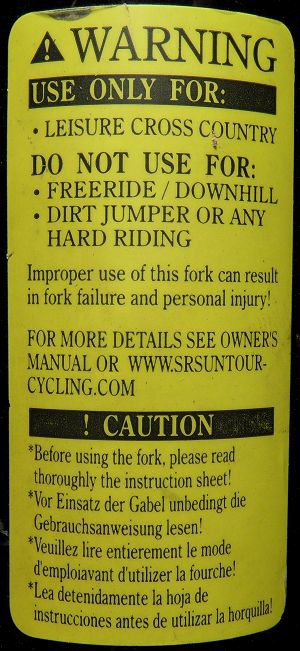
It is not imminently clear when buying a bike with Suntour Fork whether they are rated for off-road use. Many of the lower end off road forks, come with stickers saying "not suitable for freeride or downhill" or as below


Sticker says "Do not use for free ride, down hill, dirt jumper or any hard riding" This is primarily for insurance purposes. p.s. What is hard riding? LOL

The below table shows the intended uses for each type of fork that Suntour sell. The table is a little out of date so might not include newest forks. The table can be found in the General Fork Manual Suntour.

Forks covered include:

  • MOBIE
  • XCM
  • XCT
  • NEX
  • NVX
  • M3010
  • CR 
  • AXON
  • XCR
  • XCT
  • XCE


Suntour Forks Maximum Tire Width (Size)

Suntour Forks Maximum Tire Width (Size)


I have taken the below table for the Suntour "General Suspension Fork Manual". If there is one thing for sure, virtually every different model of Suntour Suspension forks has a unique maximum tire width. It is quite exhausting.

In summary you can see that for most lower range forks the maximum sizes are 54mm (2.15") for most 26" and 27.5" suspension forks, and 50mm (2.0") for most 700c Suntour Suspension forks.

I have one pair of Suntour forks (CR8 26") I have fitted 2.25" (57mm) tires and they are very snug. This is slightly over the 2.15" (54mm) suggested. So you could perhap add 3mm width above the suggested maximum widths above, but TBH that is within margin of error for most tire widths as advertised.

The table is rather large so I have had to chop it in to chunks. Soz.

The table shows forks models, stanchion size, suggested tire size, maximum tire width and maximum tire outer diameter. 


Environmental Consultants

Flood Risk Reports

Environmental Permit Applications 

Friday, 8 March 2019

Budget Suntour Suspension Forks Summary

Budget Suntour Suspension Forks Summary


I have recently bought a pair of Suntour CR8 Suspension forks. I was wondering how much better the other forks are. In short up until you upgrade to an XCR Fork you are buying a fork with a single sping in the right hand side. As you pay more you get:

  1. Stronger (Off-Road) Forks
  2. Lock Out Mechanisms
  3. More Travel
  4. Rebound Adjustment
  5. Air Springs(XCR)
I have simplified the below but, for example the "X" Range forks come with a myriad of options, even things like rebound adjustment, which mean that there are differences for each distinct sub-model.

Suntour CR8 Suspension Fork


This is one of Suntours cheapest Forks their manual indicated it is to be used on paved roads only. I have used this fork off-road and I am still alive. It has one spring! The rebound is fairly harsh, but I have found it to increase comfort of off-road rising considerably. It also enables me to ride faster off road, as it stops the front wheel bouncing across road / track surface.

Travel
40mm, 50mm
Right Side
HLO , N/A
Left Side
Coil with Preload adjuster
Crown
AC4C
Lower
Al Alloy
Brake
Pivot / Roller
Steerer tube
1.1/8", STKM
Weight
starting from: 2253g

Suntour NEX Suspension Fork


This fork is very simailr to the CR8 above, but is avaiable with disk brake mounts


Travel
50mm, 63mm
Right Side
HLO, N/A
Left Side
Coil
Crown
AC4C series Die casting
Pitch
108mm
Lower
Alloy
Brake
V-Brake or Postmount 160mm
Steerer tube
1-1/8" TS STKM, CTS Option
Axle
9mm


Suntour XCE, XCM & XCT Suspension Fork


There is no exploded view for these forks. They are likely very similar in construction to the above forks. However they must be made more strongly as they are rated for cross country use. Some of these forks also have rebound adjustment as an option.

Travel
63mm, 75mm 80mm, 100mm, 120mm
Right Side
N/A or Lockout
Left Side
Coil with Preload adjuster
Crown
AC4C
Lower
Al Alloy
Brake
V-Brake or Postmount
Steerer tube
1.1/8", STKM
Weight
starting from: 2600g
Axle
9mm

Suntour XCR Suspension Fork


This is the first fork I have viewed that offers more internal gubbins, namely an air spring in the left hand stanchion.


Flood Risk Reports

Environmental Permit Applications 

Wednesday, 27 February 2019

Intensive Program Application is Causing PC to Freeze

Intensive Program Application is Causing PC to Freeze

This a a quick tip to get around a situation where a processor intensive program or application is causing you PC to slow down.  

This method assumes you have a multi core machine. 

Step 1 - Launch

Launch the application you intend to use. In this example Foxit Phantom PDF. 

Step 2 - Set Affinity 

Press Crtl+Shift+Esc to bring up Task Manager. Select the processes tab.


Right click on the process that is causing the system to slow. Click on "Select Affinity".


Deselect 50% of the check boxes, so that the program can only use a limited number of cores. This should free up some resources so you can carry on with other stuff, whilst the intensive application munches through its task in the background.

This is handy for modelling programs, batch image compression, video rendering and other CPU intensive operations.

Drainage Consultants


Wednesday, 20 February 2019

POP, SMTP & IMAP - Repeat "Wrong Password" with Gmail - 78754 Error

POP, SMTP & IMAP - Repeat "Wrong Password" with Gmail - 78754 Error


Some notes on my trying to fix the outlook (also tried with Thunderbird) password box that pops up repeatedly even when you have entered the correct password.

The first thing to point out is if you have been using the same settings for weeks and months and this suddenly happens then maybe it is the google email server where the problem lies . . .in my case I tried all of the below and none of it worked, and then about 24 hours after the problem started, all my mail came through 100% no problems, and . .  the problem went away "on its own"

But  if it does not then perhaps try the below:

1 - Check Your Password

Briefly log in to you web mail, with what you assume to be the right password. Just to check that you have the right one.

2 - Restart Outlook

Easiest Option for potential fix. Before you start any in depth tinkering.

3 - Restart You Computer


The old ones are the best ones! Try the easiest things first.

4 -Run Scan PST 

If you have been using outlook for ages trouble free and suddenly the password pop up keeps bugging ou then the outlook data file may have become corrupted. This process takes a while but does not inclove changing settinsg that you may regret later.

If you look in C Drive > Program Files > Microsoft Office > Office 14

You will find SCANPST.EXE, open this select you OST file that is causing the problem. 

Find you OST file in My Documents > Outlook Files

5 - Wait for 24 Hours


This could be problem, or glitch with your mail server, before you start changing settings deleting files etc. wait to see if the problem fixes itself. You can always log in to you webmail in the meantime.

6 - Outlook 2013 & 2016


If you have Outlook 2016 or 2014 then download this Microsoft Diagnostic Package, and see if it helps. It will try to discover what is going on and also try to sell you Office 360!


7 - Credentials, OST Files & Cached Passwords


There is a excellent set of checks on this site, which may provide a result. These really delve in the bowels of you OS and Outlook, so save these for last. You know here there be dragons etc. 

8 - Profiles


Open the Start menu, scroll down to "Windows System", click and select "Control Panel".  From the Control Panel, click the "Mail" app (if you have "Category View" selected, the app is under "User Accounts"), click "Show Profiles", click the "Always use this profile" radio button, pick the Profile you want to use all the time from the drop down menu, click "Apply" then "OK".  


9 - Allow "Less Secure Apps" in Google Setting


You mayneed to adjust Gmail's "Less secure apps" settings:
Allowing less secure apps to access your account


10 - Unlock Account
 

One thing I have spotted is https://accounts.google.com/DisplayUnlockCaptcha , this allows you to 'unlock' your account if for some security reason (like too many connection failures(?) ot is looked from App Access.

11 - IMAP or POP must also be enabled in Gmail settings


If this is you first time trying to use POP or IMAP, IMAP or POP must also be enabled in Gmail settings.


Google Maps Ranking